
This guide is the Thread Mill topic hub for CNC parts that need a clear start point. It helps process engineers, engineering buyers, and tooling distributors decide whether thread milling fits, what inputs to gather from the drawing and machine, which follow-on task to open next, and how to package a matched tooling request. Catalogue sizes, controller-specific G-code, and full fault trees stay on their own specialist pages when those pages are live.
Aluminum housing tap-versus-mill comparisons stay on thread milling vs tapping for aluminum. Forming versus cutting taps stay on form tap vs cut tap. Design inputs that affect thread and hole feasibility stay on the CNC design for machining guide. Actual cutter families and catalogue notes stay on solid carbide thread mills.
Quick answer
- Method: a rotating cutter follows a coordinated helical or circular path so the tooth form generates the thread while the tool advances one pitch (or lead) per revolution of the path.
- Before tool selection: lock the full thread callout, material and pre-hole state, blind or through geometry, reach and clearance, and machine interpolating capability.
- Before cutting: verify path sense, pitch or lead, internal or external direction, compensation state, entry and exit, and that CAM inputs match the physical tool.
- After cutting: accept the thread against the drawing and the agreed gauging or measurement method, with first-off records taken before compensation changes.
Start here (pick the row that matches your current state):
| Your state | Do this first | Go to |
|---|---|---|
| Not sure thread milling fits | Check applicability and compare routes under trial framing | What is thread milling · Compare routes |
| Drawing in hand, no cutter yet | Build the input sheet, then open selection factors | Start with the thread · Choose next task |
| Cutter chosen, program not proven | Run the program verification framework | Verify the program |
| Parts cut, size or surface fails | Keep evidence, then diagnose before more compensation | Diagnose fails · Inspection |
Jump: Fit · Inputs · Next task · Routes · Inspection · RFQ · Tooling · FAQ
What is thread milling, and when does it fit?
Thread milling uses a rotating cutter whose profile matches the required thread form (or a portion of it) while the CNC interpolates a path that creates the helix. Educational threading literacy describes how the tool spins and the centerline walks a circle or helix so pitch is set by axial advance per path revolution; see this thread milling process overview and this broader threading methods overview. Treat those pages as motion principles, not as HC cutting data.
How the cutting motion creates the thread
- Rotation plus path: the cutter rotates; the tool center follows a programmed circular or helical path sized for the major and minor diameters you need.
- Pitch versus lead: pitch is the axial distance between adjacent flanks of the same start; lead is the axial advance per full path revolution. For single-start threads they match; multi-start threads need lead entered correctly.
- Internal versus external: internal paths usually work inside a pre-hole; external paths wrap an OD. Sense (climb or conventional) and entry strategy differ and must match the CAM setup.
- Pre-machining: the hole or OD must already leave the correct stock for the selected cutter diameter and engagement. Wrong pre-size is a drawing and process issue before it is a “bad mill” issue.
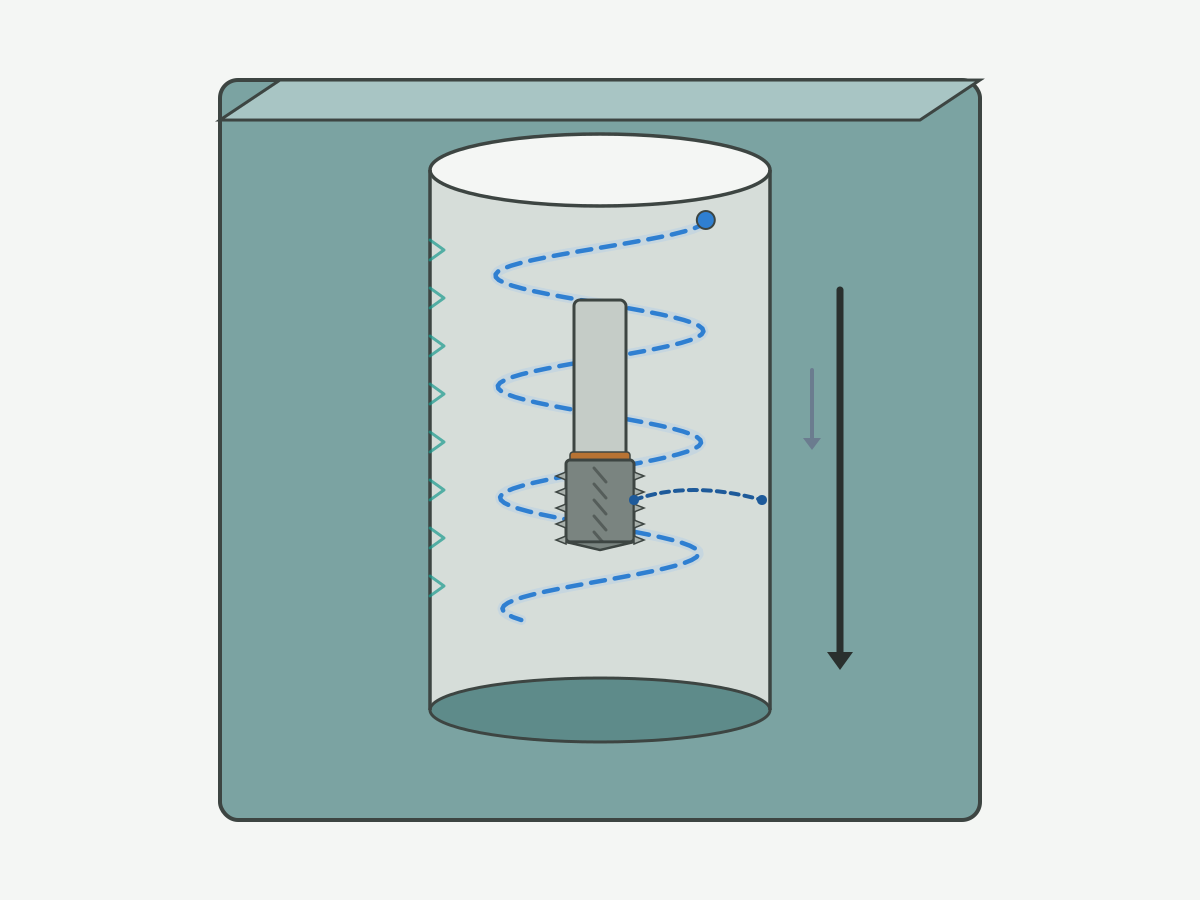
Schematic illustration: not a machine-ready toolpath. Confirm diameters, pitch, and clearance on your drawing and CAM setup.
Conditions worth evaluating (trial framing)
Evaluate thread milling when several of the following are true. Do not treat the list as a promise that milling is always faster, cheaper, or gentler than tapping without a controlled trial.
- You need one cutter family to cover several related thread sizes or a controlled pitch range.
- Blind holes, thin walls, or interrupted features make tap breakage or chip packing a documented risk.
- The machine can interpolate the required circular or helical path with acceptable path accuracy for the tolerance class.
- You can inspect and record first-off results before changing compensation or engagement.
- You are willing to compare full accepted-part time (including inspection and scrap) against the current route, not cutting time alone.
Method-selection literacy such as this threading method selection overview and this thread milling versus tapping comparison note helps frame the comparison. Shop examples on aluminum housings remain on thread milling vs tapping for aluminum.
Machine, control, holder, and coolant checks
- Interpolation: confirm circular or helical interpolation is enabled and that path tolerance matches the thread class you must hold.
- Post and CAM: verify the post outputs the intended arc or helix format; do not paste unverified controller macros from the open web into production.
- Holder and projection: stick-out, runout, and balance affect size and finish; toolholding literacy such as this toolholding overview and this tool holder technology overview belongs in the setup checklist.
- Coolant or air: confirm delivery reaches the cut zone for the material and depth; fluids literacy such as this coolant know-how overview supports the boundary discussion without inventing a single “best” recipe.
When to compare other routes before selecting a cutter
If the plant already has a stable tapping process with acceptable scrap and cycle time, open a fair trial before forcing a route change. If the material favors chipless forming, review forming taps with engineering before defaulting to milling. Route comparison details sit in Compare the machining routes. Forming versus cutting tap OWN stays on form tap vs cut tap.
Start with the thread and the hole
Selection and programming both fail when the thread callout is incomplete. Build an input sheet before you open a catalogue or a CAM wizard.
Capture the full thread callout
- Standard family and designation (for example metric M, Unified, or pipe), including series and class or tolerance where stated.
- Major and minor limits or the gauge class the drawing requires.
- Handedness (right or left), number of starts, and pitch or lead.
- Internal or external; through or blind; any related positional or runout callouts.
Public screw-thread and metrology portals such as this screw thread standards portal, this metric M screw threads standard entry, this national standards overview, and this public metrology laboratory entry help you name which document the drawing inherits. They do not replace the revision on your print.
Separate full thread depth, hole depth, clearance, and reach
- Full thread depth: axial length that must meet the thread requirement.
- Hole depth: drilled or bored depth available before the floor or breakthrough.
- Clearance / runout: space needed for entry, exit, and chip room at the bottom of a blind hole.
- Tool reach: fluted length, neck, and holder projection that can actually cut that depth without collision.
Leave numeric allowances blank until the drawing and cutter data fill them. Do not invent a universal “safe” leftover depth for every housing.
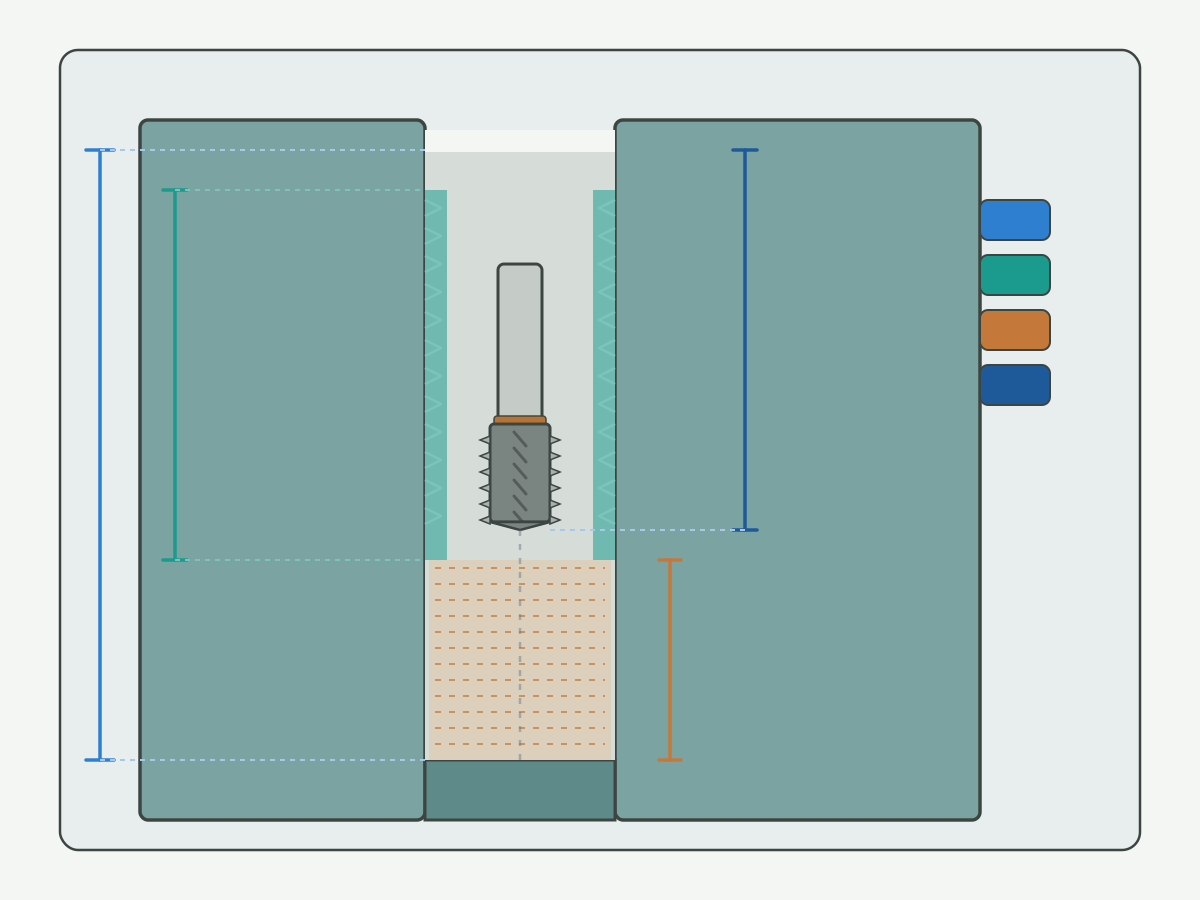
Schematic blind-hole section: symbols only. Fill depths from the drawing and the selected cutter.
Internal threading motion literacy such as this internal threading overview and external counterpart literacy such as this external threading overview help teams separate path geometry from tap mechanics.
Material condition and pre-hole state
- Material grade and condition (annealed, tempered, cast skin, and so on).
- Pre-hole process (drill, bore, ream) and measured size at entry, mid, and exit when available.
- Cross holes, keyways, thin walls, or interruptions that change engagement.
- Coolant type and whether through-tool delivery is available.
Pre-hole quality often decides whether a thread mill can hold class. Design notes that affect hole and thread feasibility belong on the CNC design for machining guide. Drilling literacy that feeds pre-hole discussions is summarized in this drilling knowledge overview.
Setup and production requirements
- Machine model and control family (for capability notes, not for pasting unverified macros).
- Fixture rigidity, part orientation, and whether the feature is reachable in one setup.
- Batch size, mix of thread sizes, and whether one cutter covering a range is a real need.
- Current scrap modes, tap breakage history, or rework cost drivers (qualitative is enough at this stage).
Thread milling input sheet (page table)
Use this table as a working sheet. A downloadable file can be linked later after the file is built and checked. Unknown fields may stay blank; do not invent model numbers.
| Field group | What to capture | Status |
|---|---|---|
| Drawing and thread | Revision, full callout, hand, starts, full thread depth | |
| Hole and feature | Pre-hole size and process, blind/through, interruptions, thin walls | |
| Material | Grade, condition, hardness band if known | |
| Machine and holder | Control capability, holder, projection, coolant path | |
| Production task | Volume intent, current route, known failure modes | |
| Acceptance | Gauge or measure method, first-off rules, stop conditions |
When the sheet is filled enough to compare cutters, open selection factors in Select a cutter and review live catalogue families on solid carbide thread mills. A dedicated selection matrix page will hard-link here when published; until then stay on this hub and the product page.
Choose your next task
This section is the navigation core. Pick one task. Do not try to solve selection, programming, and diagnosis in one undifferentiated note.
Select a cutter for a defined thread
Compare at least these variables before you freeze a part number:
- Thread form and pitch compatibility with the tooth profile.
- Cutting diameter versus entry hole or approach space.
- Single-form, triple-tooth, or multi-form construction.
- Effective length, neck, and stick-out versus required full thread depth.
- Material group and edge or coating configuration stated for that family.
This hub lists selection factors only. Full conditional matrices and model confirmation belong on a specialist selection guide when live, plus drawing review on the product side. Explore current families on solid carbide thread mills.
Verify the program before cutting
- Drawing requirements, tool data sheet, and CAM inputs agree on pitch or lead, hand, and internal or external sense.
- Path diameter, axial advance, and entry or exit moves clear the part and fixture.
- Feed definition in the software matches how the tool note expresses feed (per tooth, per minute, or centerline versus peripheral).
- Cutter compensation state is intentional and recorded for the first-off.
- Simulation or dry-run checks are complete before metal.
Controller-specific G-code libraries and unverified universal macros are out of scope here. CNC motion literacy such as this CNC thread milling programming overview and this CNC G-code literacy overview supports reading, not copying, programs. A dedicated programming verification guide will hard-link here when published.
Diagnose a thread that does not pass inspection
Before changing compensation again, keep:
- Which characteristic failed and where along the thread.
- Gauge type or measuring method and its calibration state.
- Whether the fail appeared on first-off, mid-batch, or after a tool change.
- Tool condition, holder, projection, and any program edits since the last accept.
- Measurement before and after the last compensation change.
Check measurement and setup integrity first. Do not assume “add compensation” is the fix. A dedicated troubleshooting guide will hard-link here when published; until then use the stop conditions in Define inspection and trial acceptance.
Use the live guide directory
Only publicly reachable rows appear below. Specialist selection, programming, and troubleshooting guides will be added after they go live.
| Current task | Guide | After reading you can | Status |
|---|---|---|---|
| Decide fit and next task | This page (Thread Milling Guide) | Build inputs and choose the next action | This page |
| Compare mill vs tap on aluminum housings | Thread milling vs tapping for aluminum | Frame an aluminum-specific route trial | Live |
| Compare forming vs cutting taps | Form tap vs cut tap | Decide when chipless forming is in scope | Live |
| Check design inputs | CNC design for machining guide | Align hole and thread design constraints | Live |
| Review cutters and sizes | Solid carbide thread mills | See live families and open an RFQ | Live |
Applying the guide to a blind threaded housing (instructional example)
Instructional / hypothetical example only. This is not a verified HC customer case and invents no life, scrap rate, or cycle-time claims.
Imagine an aluminum housing with a blind internal thread. Walk the hub in this order and stop when an input is missing:
- Extract the full thread callout and required full thread depth from the drawing revision in hand.
- Confirm pre-hole depth, floor clearance, and holder reach; stop if clearance is unknown.
- Confirm the machine can interpolate the path and that coolant can reach the cut.
- Send the filled input sheet into cutter comparison on the product page; stop if pitch or form is ambiguous.
- Agree the gauge or measure method before the first chip.
- Record first-off results before any compensation edit; escalate to diagnosis if the same fail repeats.
Information gain: each missing field is a stop, not a guess. Empty cells beat invented numbers.
Compare the machining routes
Not every threaded feature should default to thread milling. Compare under conditions, then trial.
Thread milling, cutting taps, and forming taps (conditional)
| Situation / constraint | Routes worth evaluating | Must confirm before choosing | Next step |
|---|---|---|---|
| Mixed thread sizes, one cell | Thread milling | Form coverage, cutter diameter vs entry, reach | Selection factors · product page |
| Mature tapping process already stable | Cutting tap and thread milling side by side | Scrap, change-over, full accepted-part time | Fair trial (§4.3) |
| Chipless forming may fit the material | Forming tap | Material suitability, prep hole, torque path | Form vs cut tap |
| Blind hole or thin wall with prior tap risk | Thread milling and tapping under trial | Full thread depth, distortion, chip exit | Drawing + fixture review |
| Aluminum housing specialty comparison | Tap vs mill on that material family | Housing geometry and acceptance method | Aluminum tap vs mill |
The table is a writing and decision framework. Final ranking needs engineering review on your print. Third-party comparison notes such as this thread milling application note and this thread milling practice overview add literacy; they are not HC trial results.
Compare the complete accepted-part process
Include prep time, threading time, tool changes, inspection, scrap or rework, and change-out rules. Distinguishing cutting time from full process time avoids mistaking a short cut for a lower total cost. Leave numeric cells blank until your plant fills them. Cutting-data literacy portals such as this cutting data notes portal help discuss baselines without inventing a universal feed table for every controller.
Define a fair trial before changing routes
- Same drawing revision and acceptance criteria.
- Same material lot family or an explicit lot flag.
- Same record fields for time, scrap, and tool changes.
- Documented process boundaries and allowed adjustments.
- Stop rules when size drifts or edges chip.
Do not claim a route “won” without those controls. Longer aluminum-specific comparisons remain on the live aluminum page linked above.
Define inspection and trial acceptance
Agree what “pass” means before the first compensation change. Inspection and programming must share one acceptance story.
Agree what must pass
- Thread size and class or tolerance band from the drawing.
- Full thread depth requirement.
- Entry quality, burr, and related surface notes.
- Any positional, runout, or functional assembly requirement.
- Extra acceptance rules for pipe or sealing threads when stated.
Methods follow the applicable standard, the drawing, and the written agreement between parties. Metrology and legal metrology literacy such as this weights and measures overview and manufacturing standards literacy such as this manufacturing society portal support process discipline; they do not invent your gauge plan.
Match each requirement to an inspection method
| Requirement | Example method family | Record |
|---|---|---|
| Functional fit | Go / no-go or equivalent functional gauges | Pass/fail, gauge ID, operator, time |
| Size or pitch diameter when required | Agreed measuring setup | Value, location, instrument |
| Full thread depth | Depth check tied to the drawing datum | Value and method |
| Entry / burr / damage | Visual or agreed edge check | Photo when borderline |
| Your plant’s extra feature | As specified | Leave blank until defined |
Ask explicitly: does a single functional gauge result cover every drawing requirement? Answer from the applicable inspection documents for that thread system. Do not generalize.
Record the first-off before compensation changes
- Part ID and drawing revision.
- Tool ID and revision or grind state.
- Program version and compensation state at cut.
- Machine and fixture notes.
- Method, result, and location of any fail.
- Reason for the next adjustment and the re-measure result.
This page does not publish cross-controller rules for which way to bump compensation.
Set trial acceptance and stop conditions
- First-off acceptance criteria.
- Repeat-piece observation window.
- Tool change-out triggers.
- Stop and escalate when size keeps drifting, cutting marks look abnormal, or the edge is damaged.
Persistent fails after setup and measurement checks belong in diagnosis, not in endless compensation. Use Diagnose a thread that does not pass as the holding pattern until a specialist troubleshooting guide is live.
Thread mill RFQ checklist
Send what you know. Model numbers are optional when the drawing and constraints are complete.
- Drawing and thread: revision, full callout, hand, starts, full thread depth.
- Material and feature: material state, pre-hole, blind or through, cross holes, thin walls.
- Machine and setup: machine and control family, holder, projection, coolant.
- Production task: current route, known problems, quantity intent, repeat need.
- Acceptance: inspection method, critical quality notes, sample validation plan.
Open the request form when the package is ready: custom cutting tool RFQ.
Request application-matched tooling
Hand the engineering inputs to a product and RFQ path that can confirm a matched cutter, not a generic catalogue guess.
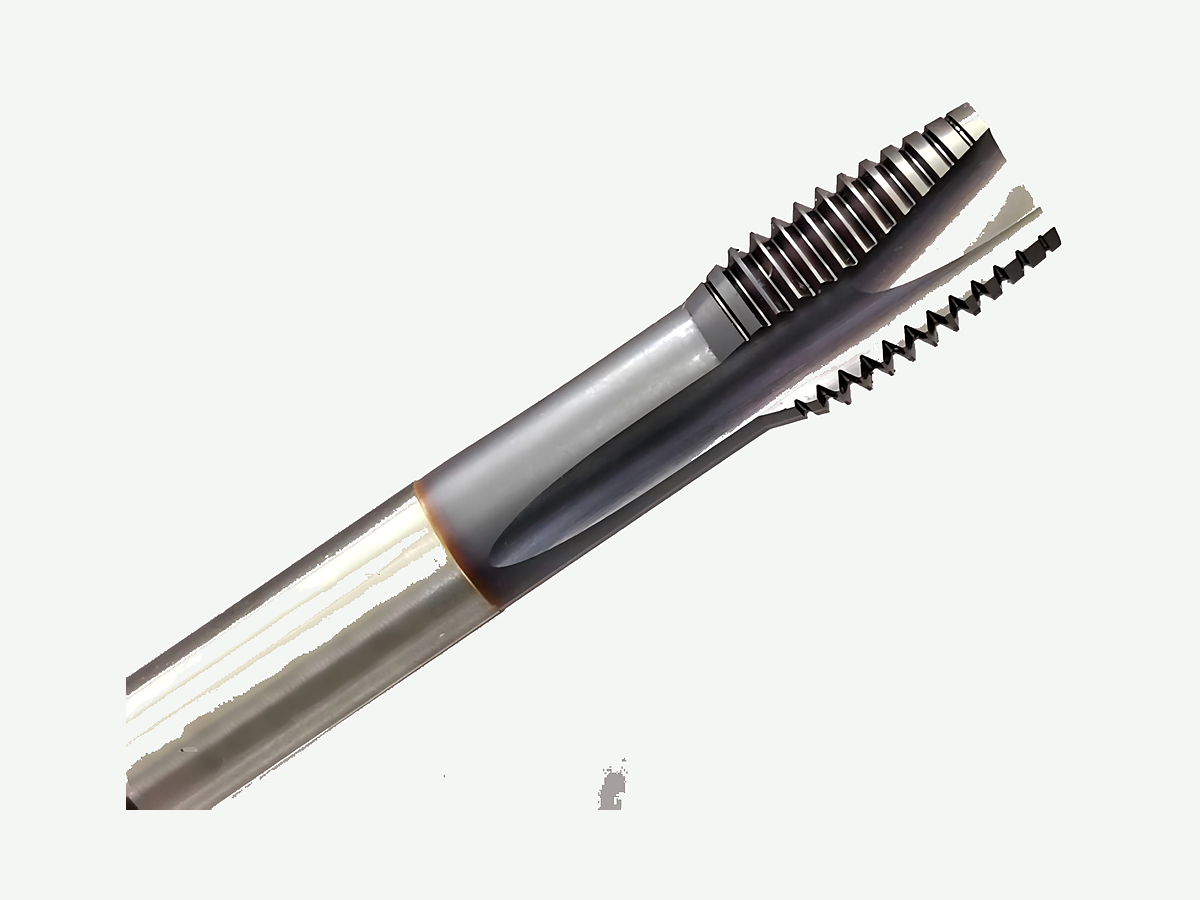
Review the actual thread mill range
On the product page, review listed cutter constructions, size tables, material series notes, and any selection limits stated there. Start here: explore solid carbide thread mills. That link also appears after the selection factors above so the commercial path is not only at the end of the article.
Define what the proposal needs to confirm
- Proposed tool model or drawing.
- Thread form and pitch (or lead) coverage.
- Cutting diameter, effective length, and clearance geometry.
- Material group and configuration notes.
- Inspection and sample acceptance expectations.
- Identifiers needed for repeat orders.
No price, MOQ, or unverified lead time is stated on this page. Research and production portals such as this CIRP research portal and this cutting tools practice overview support industry literacy only.
Request a matched thread mill proposal
Suggested enquiry subject: Thread mill review - [thread callout] - [material] - [blind/through]
Thread Milling Guide FAQ
When is CNC thread milling worth evaluating?
Evaluate it when you need flexible size coverage, when tap breakage or chip packing is a documented risk on the feature, when the machine can interpolate the required path, and when you can inspect first-off results under an agreed method. Treat that as a trial framing, not a claim that milling is always faster or cheaper than tapping.
What inputs should I gather before selecting a thread mill?
Capture the drawing revision, full thread callout, full thread depth, pre-hole state, material condition, blind or through geometry, machine and holder notes, coolant path, and acceptance method. Unknown model numbers can stay blank when the drawing and constraints are complete.
How should I start comparing thread milling with tapping?
Compare under the same drawing revision and acceptance criteria, include full accepted-part time rather than cutting time alone, and run a fair trial with stop rules. Use aluminum-specific notes when the part is an aluminum housing, and forming-versus-cutting tap notes when chipless forming is in scope.
What should I check in the program before the first cut?
Confirm pitch or lead, hand, internal or external sense, path clearance, feed definition versus the tool note, compensation state, and entry or exit moves. Dry-run or simulate before metal. Do not paste unverified controller macros into production from this hub.
What should I do first when the first-off thread fails inspection?
Keep the failed characteristic, gauge or measure method, tool and program state, and whether the fail appeared at first-off or after a change. Re-check measurement and setup before more compensation. Escalate when the same fail repeats under controlled conditions.
Can I request a matched thread mill without knowing the model number?
Yes. Send the drawing revision, thread callout, material and feature notes, machine and holder constraints, and acceptance method. The proposal should confirm model or drawing, coverage, length and clearance, and repeat-order identifiers.
Does this guide replace selection, programming, or troubleshooting manuals?
No. This page is the hub for fit, inputs, next-task navigation, inspection framing, and RFQ packaging. Detailed selection matrices, controller programs, and full fault trees belong on specialist pages when those pages are live, plus the product catalogue for live cutter families.
When does this page not apply?
It does not apply when you need invented life percentages, prices, ROI, or unverified case counts; when you need controller-specific G-code pasted as a universal recipe; or when the drawing thread callout is missing and nobody will stop to recover it. Fix the inputs first.
Sources and related guides
Outbound references support threading motion literacy, method selection, internal and external threading education, toolholding and coolant boundaries, screw-thread and metrology portals, CNC thread-milling programming literacy, and manufacturing practice portals cited in the body. Manufacturer-specific cutting data remain tied to their own products. The blind-housing walkthrough is an HC editorial teaching aid, not a measured customer result. Sources checked for this draft on 22 October 2026 (Asia/Shanghai).
- Thread milling process overview (third-party education page; linked in body)
- Threading methods overview (third-party education page; linked in body)
- Threading method selection overview (third-party education page; linked in body)
- Thread milling versus tapping comparison note (third-party education page; linked in body)
- Toolholding overview (third-party education page; linked in body)
- Tool holder technology overview (third-party education page; linked in body)
- Coolant know-how overview (third-party education page; linked in body)
- Screw thread standards portal (public standards entry; linked in body)
- Metric M screw threads standard entry (public standards entry; linked in body)
- National standards overview (public standards entry; linked in body)
- Public metrology laboratory entry (public metrology entry; linked in body)
- Internal threading overview (third-party education page; linked in body)
- External threading overview (third-party education page; linked in body)
- Drilling knowledge overview (third-party education page; linked in body)
- CNC thread milling programming overview (third-party education page; linked in body)
- CNC G-code literacy overview (third-party education page; linked in body)
- Thread milling application note (third-party education page; linked in body)
- Thread milling practice overview (third-party education page; linked in body)
- Cutting data notes portal (third-party tooling education; linked in body)
- Weights and measures overview (public metrology entry; linked in body)
- Manufacturing society portal (public manufacturing literacy; linked in body)
- CIRP research portal (third-party research society; linked in body)
- Cutting tools practice overview (third-party education page; linked in body)
Related live guides: thread milling vs tapping for aluminum · form tap vs cut tap · CNC design for machining guide · solid carbide thread mills · custom cutting tool RFQ. Specialist selection, programming, and troubleshooting guides will be linked here after they publish.