
Search results for indexable tools often mix insert catalogs, holder family pages, and milling cutter brochures on one screen. Process engineers then open several tabs and still lack a single place to confirm structure first, lock the insert and body interface, then choose a turn, mill, or drill path before they weigh solid tools against indexable options.
HENTRY publishes this guide as a process-selection page for indexable cutting tools. You walk structure (reusable body plus replaceable insert), then insert and body interface checks, then a turn, mill, and drill application map, then a solid versus indexable checklist, then cost and maintenance notes that route to live product families. The page does not host a full ISO insert code table, a fake stock matrix, or unverified life claims. Product families and buy-select geometry belong on the cutting-inserts, turning-tools, indexable face-milling, and shell-mill product pages; here you finish structure and selection checks before you request a tooling review.
Structure jumps to the body and insert checklist. Application map opens the turn, mill, and drill routing. Product path opens the live family routing and RFQ field list.
Indexable tools mount replaceable inserts on a reusable body. Confirm the insert seat, clamp style, and clearance before you pick a turn, mill, or drill path. Weigh solid tools against indexable options on rigidity, edge economy, and changeover. Product families live on cutting-inserts, turning-tools, and indexable face-milling pages; this guide finishes structure and selection checks before you request a tooling review.
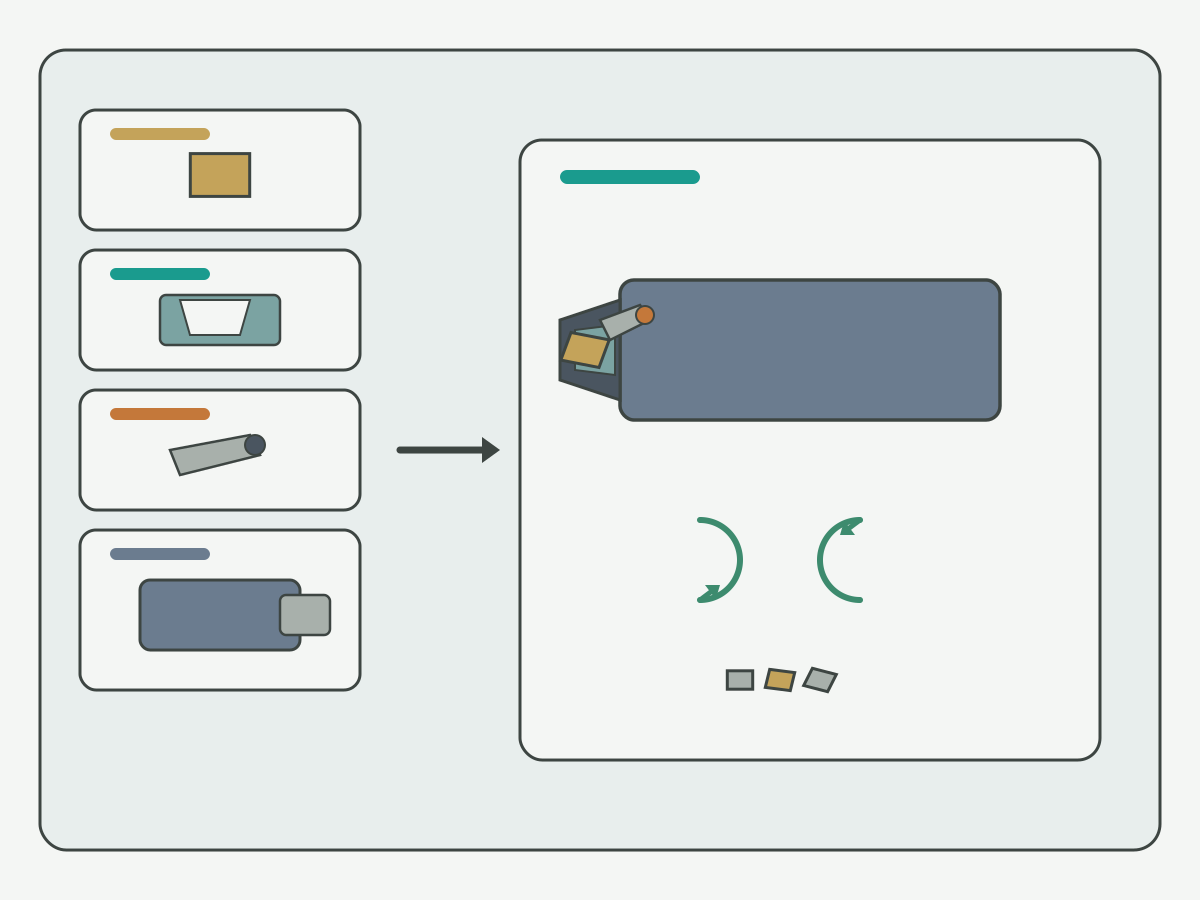
Indexable Structure: Body + Replaceable Insert
Use the structure checklist below as a shop-dependent routing aid, not as a guarantee of tool life, surface finish, or a fixed HENTRY stock catalog. Typical industry groups help you ask better questions; blank cells stay blank until application engineering confirms them for your material, machine, and drawing.
| Part | What it does | What to lock on the traveler | Leave blank if unknown |
|---|---|---|---|
| Replaceable insert | Carries the cutting edge; can be indexed or swapped when worn | Shape class, size class, grade group, edge prep tendency | Yes; leave blank rather than inventing an ISO full table here |
| Seat / pocket | Locates the insert against fixed faces | Seat style, contact faces, shim if used | Yes; confirm with application engineering |
| Clamp / screw | Holds the insert against the seat under load | Screw, lever, wedge, or other clamp taxonomy | Yes |
| Reusable body / holder | Carries the seat and interfaces to the machine | Shank or arbor interface, reach, coolant features | Yes |
An indexable cutting tool separates the cutting edge from the reusable body. The insert carries the edge; the body carries the seat, clamp hardware, and the interface to the spindle, turret, or arbor. That split is the core difference from a solid tool, where the edge and the shank are one piece. Write both sides on the traveler before you treat any catalog nickname as locked.
Common parts on the traveler include the insert, the seat or pocket, the clamp or screw, any shim under the insert, and the body or holder. Each part can fail the package even when the insert grade looks correct on paper. A worn seat, a missing shim, or a clamp that does not match the insert hole style can loosen the edge under load. Mark unknown part cells as engineering-confirm instead of filling them with brochure guesses.
Shape and size codes for inserts belong as input classes on this page, not as a pasted ISO encyclopedia. Record the shape family, inscribed-circle or size class, and thickness class your print or process sheet already uses. Deep shape and grade selection for turning inserts lives on a dedicated Knowledge page linked later; this hub only names that those codes are inputs to the seat and clamp check.
Shop-dependent results still need application engineering confirm before you treat any structure path as locked. Coolant delivery, holder rigidity, and spindle condition move the same insert and body into different outcomes. Keep those setup notes beside the structure checklist rather than treating a family name as a stock promise.
Insert-Body Interface Checks
After structure parts are named, lock the interface between insert and body. Seat geometry, clamp style, and clearance decide whether the edge stays seated under cutting load.
| Check | What to lock | Industry checklist notes | Leave blank if unknown |
|---|---|---|---|
| Seat geometry | Contact faces, pocket angle, shim presence | Poor contact raises chatter and edge chipping risk | Yes |
| Clamp style | Screw, lever, wedge, or other taxonomy | Clamp must match insert hole or top clamp style | Yes; confirm with engineering |
| Clearance / interference | Relief behind the edge; holder to workpiece clearance | Interference can force a different holder or lead angle | Yes |
| Edge risk notes | Loose clamp, wrong seat, wrong clearance | Checklist only; not a customer case package | Yes |
Seat geometry is the first interface line. The insert must sit against the intended faces so cutting forces push into the body rather than rocking the edge. If a shim is part of the design, write whether it is present and undamaged. A seat that looks close enough in a photo can still rock when the clamp torque is applied.
Clamp style is taxonomy language on this page: screw-on, lever, wedge, and similar industry groups. Match the clamp to the insert hole style or top-clamp geometry before you copy a torque note from a neighboring job. A clamp that does not seat fully can look tight and still allow micro-movement that chips the edge.
Clearance and interference sit beside clamp checks, not after the first trial cut. Relief behind the cutting edge, holder clearance to the workpiece, and lead-angle interactions can force a different body even when the insert shape class is correct. Write those notes on the traveler so the product path later does not inherit a hidden interference.
Wrong seat, loose clamp, and clearance misses are risk checklist items, not invented shop stories. This page does not publish case percentages or life curves from those failure modes. If a prove-out window is required, it belongs on an approved process sheet after engineering confirm, not as a permanent claim in this Knowledge body.
Turning, Milling & Drilling Application Map
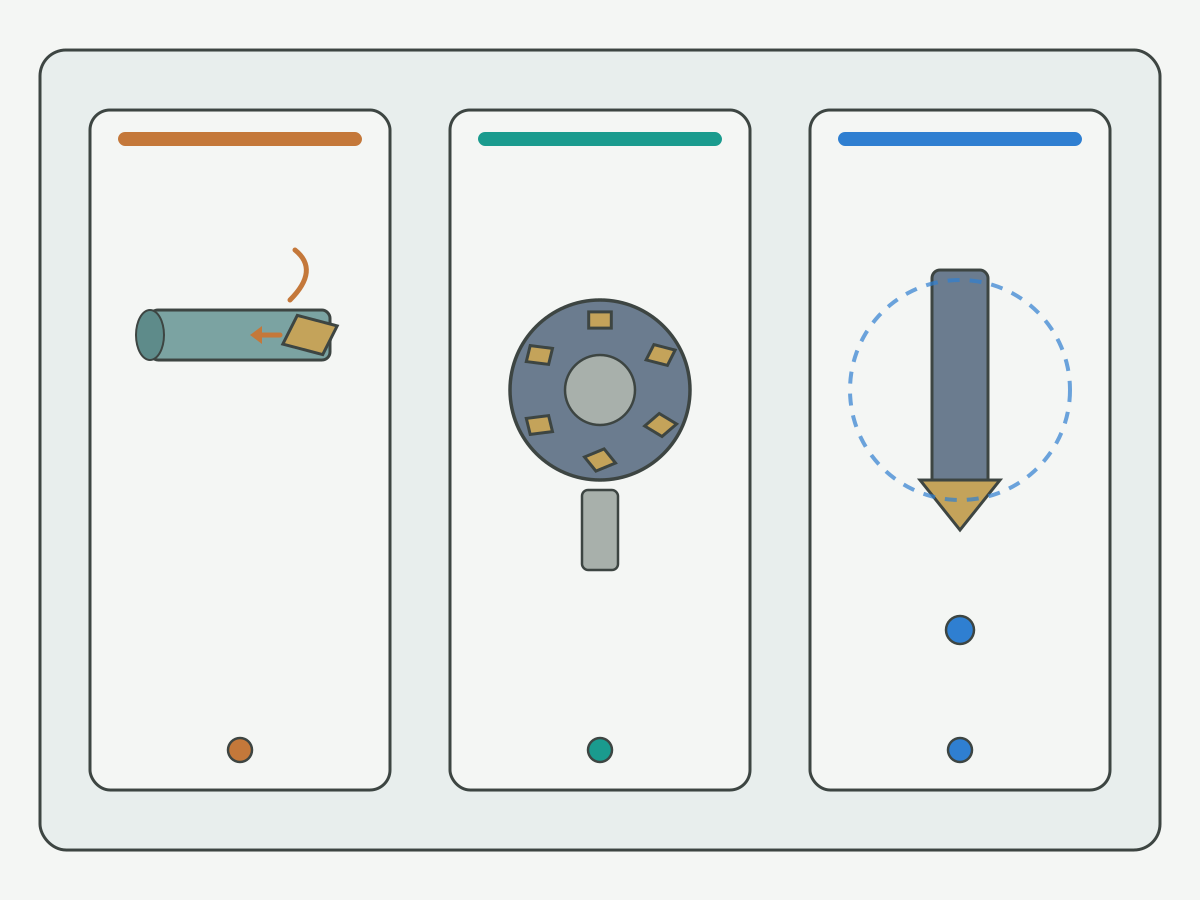
When structure and interface checks are named, route by process family. The map below is a tendency guide, not a ranking that claims one path always costs less.
| Process | Typical indexable path | Where to go after checks | Notes |
|---|---|---|---|
| Turning | Turning holders + replaceable inserts | Live turning-tools and cutting-inserts product pages | Deep shape/grade selection stays on the turning-insert Knowledge page |
| Milling | Indexable face mill or shell mill bodies | Live indexable face-milling and shell-mill product pages | Support path only; milling family detail stays on those product pages |
| Drilling | Indexable drill | Live product page + application review | To-drawing supply; see FAQ link to indexable drills |
Turning is often the clearest indexable path on this site. Confirm holder style, insert seat, and clamp notes, then open the live product families after the checklist. For turning holders, use the live turning tools product page. For the insert family after shape and grade inputs are named elsewhere, use the live cutting inserts product page. Keep ISO full tables and grade deep-dives off this hub.
Milling appears here as an application path, not as a milling encyclopedia. When the traveler points to an indexable face mill, open the live indexable face milling cutter product page for family geometry. When the traveler points to a shell-mill style body, open the live shell mill product page. This guide does not expand PCD face-mill specialty tables; a short PCD milling entry appears later only as an optional support link.
Drilling with indexable bodies is a real industry path. HENTRY publishes a live indexable-drills product page for to-drawing supply after review (linked from the FAQ below). Name material, hole depth, coolant, and rigidity on the traveler, then send the package through application review.
Prefer indexable options when edge economy, multi-corner indexing, or larger diameters dominate cost and changeover time. Prefer solid tools when small diameters, micro edges, high spindle speed, or vibration-sensitive finishes make a one-piece tool more practical in industry practice. Those are tendency notes only. Absolute claims that indexable tools always cost less stay out of this guide.
Solid Tools vs Indexable: Comparison Checklist
After the application map, weigh solid tools against indexable options on the same traveler. Use checklist language, not a permanent ranking.
| Factor | Solid tools often favor | Indexable tools often favor | Leave blank if unknown |
|---|---|---|---|
| Rigidity / overhang | Small diameters, short reach, high-speed spindles | Stable setups with room for a seat and clamp | Yes |
| Edge economy / changeover | When regrind logistics already work | When indexing or swapping inserts cuts downtime | Yes |
| Diameter / flute count | Micro tools and limited flute room | Larger diameters and multi-edge bodies | Yes |
| Surface / vibration sensitivity | When a one-piece edge reduces joint variables | When seat quality and clamp torque are controlled | Yes; confirm with engineering |
Rigidity and overhang often decide first. A solid tool keeps the edge and shank as one piece, which can help small diameters and long slender reaches in industry discussion. An indexable body adds a seat joint; that joint is fine when the setup is rigid and the clamp is correct, and it becomes a risk when overhang or chatter already dominates.
Edge economy and changeover sit next. Indexable inserts can index unused corners or swap a worn edge without replacing the whole body. Solid tools often rely on regrind cycles or full replacement. Neither path is automatically cheaper. Write the changeover time, insert inventory practice, and regrind logistics your shop actually uses before you claim a cost winner.
Diameter and flute count push many large face-mill and shell-mill jobs toward indexable bodies, while micro end mills and tiny drills often stay solid. Surface and vibration sensitivity can favor either path depending on seat quality, holder balance, and machine condition. Keep those cells blank until application engineering confirms them for your material and machine.
This page does not publish invented cost percentages, life multipliers, or stock prices. If a prove-out cost model is required, it belongs on an approved process sheet after engineering confirm.
Cost, Maintenance & Selection Path
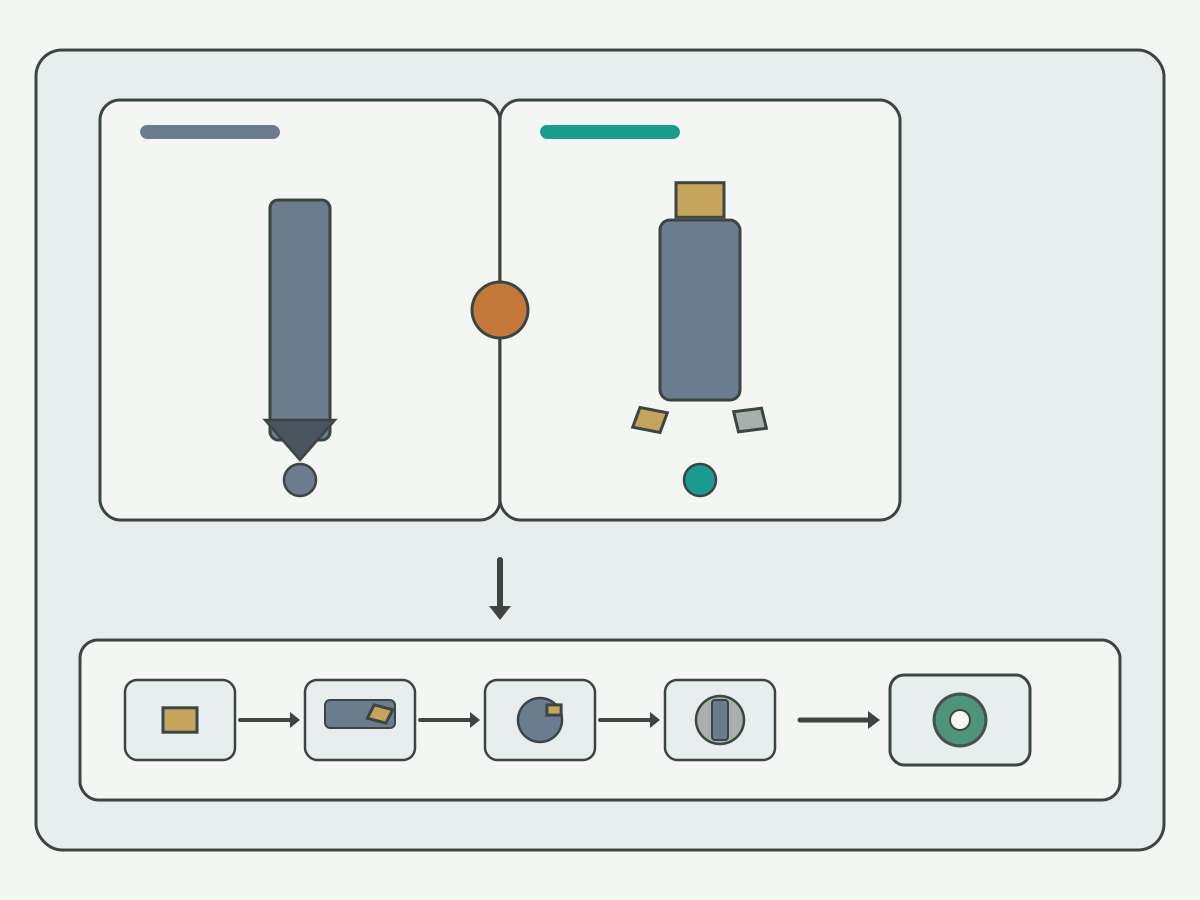
When structure, interface, application map, and solid-versus-indexable checks are named, route to live product families and the RFQ package. This section is a path map, not a second product catalog.
| Decision after checks | Where to go | What that page owns |
|---|---|---|
| Insert family / grade entry | Live cutting-inserts product page | Insert family overview and buy-select entry |
| Turning holders locked | Live turning-tools product page | Holder family geometry and selection |
| Indexable face milling locked | Live indexable face-milling product page | Face-mill family geometry |
| Shell mill path locked | Live shell-mill product page | Shell-mill family geometry |
| Indexable drill path | Live product page + application review | To-drawing supply after review |
Cost and maintenance notes belong on the traveler beside the product path. Insert inventory, spare clamps and screws, seat cleaning, and torque practice change the real cost of an indexable package even when the insert price looks familiar. Solid tools shift cost into regrind logistics and full-tool replacement. Write those practices as checklist fields rather than inventing a permanent savings percentage.
The live cutting-inserts and turning-tools entries already appear once in the application map section; do not repeat those URLs here. The live indexable face-milling and shell-mill entries likewise appear once above. After those family pages, open only the deep Knowledge page that matches the next question. For turning insert shape and grade depth after this hub names the boundary, use the live turning insert selection guide. Keep the full shape and grade walk-through there.
When a PCD milling path is already preferred after non-ferrous checks elsewhere, a short support entry is the live PCD milling cutter product page. This guide does not expand PCD face-mill specialty tables. Indexable drill families are covered on the live indexable-drills product page (see FAQ below); this guide does not expand drill specialty tables.
RFQ fields that usually speed review include workpiece material and hardness band, process family (turn, mill, or drill), insert shape and size class if known, holder or arbor interface, clamp preference, reach and overhang, coolant practice, surface or rigidity notes, quantity or trial window, and whether a solid alternative is still open. Leave unknown cells blank rather than guessing ISO codes or stock SKUs this page does not list.
Process Guide vs Product & Deep Pages
Readers sometimes want one page that both teaches indexable structure and sells every SKU. On this site that split is intentional. Knowledge pages lock structure and selection. Product pages carry family geometry and purchase selection after those inputs are clear. Deep Knowledge pages own turning-insert shape and grade detail and other specialty topics.
| Page | What it covers | How to use it with this guide |
|---|---|---|
This guide (/resources/indexable-tools-guide) | Indexable structure; insert-body interface; turn/mill/drill map; solid vs indexable; product path | Decide selection inputs and RFQ package here |
| Cutting-inserts / turning-tools / indexable face-milling / shell-mill product pages | Family / buy-select geometry | Use the live product entries already linked in the application map and product path sections |
| Deep Knowledge (turning insert selection and related specialty) | Specialty process detail | Open only the deep page that matches the next question; already linked where context needs it |
| Indexable-drills product track | Live product page published | To-drawing supply; FAQ carries the product link |
Merging structure selection into the product template would force either a catalog dump into this guide or a process essay into the product page. Both fail the split for this URL. Keep selection ownership here, and keep family selection on the product pages already linked above.
Related Live Links (Hard Links Only)
Each live page below owns a slice this guide must not dump. Open only the page that matches the next question. Product family links already appear once in the application map or product path sections; do not repeat those URLs here.
- Turning insert shape and grade depth is already linked once in the product path section; do not repeat that URL here.
- PCD milling support is already linked once in the product path section; do not repeat that URL here.
- For a broader CNC process frame after structure and selection are locked, use the CNC machining handbook as an optional upper hub. This indexable-tools page keeps structure and selection ownership.
This page does not paste ISO full insert tables, unverified life claims, or unpublished product URLs into this guide. If a numeric prove-out window is required, it belongs on an approved process sheet after engineering confirm, not as a permanent claim in this Knowledge body.
Evidence Notes and FAQ
Evidence on this page. The structure checklist, insert-body interface checks, turn/mill/drill application map, solid versus indexable comparison, and live product path are the owned artifacts. Schematics are illustrations for classification and setup orientation. Live product and guide links appear once each. No approved customer case package is attached, so no case percentages or life multipliers appear.
What is not claimed. Absolute tool-life guarantees, prices, stock promises, fake ISO full tables as HENTRY inventory, and absolute surface-finish guarantees are out of scope. Product specification tables stay on the cutting-inserts, turning-tools, indexable face-milling, and shell-mill product pages. Unpublished product URLs stay out of this guide.
How to read illustrations. FIG1 shows the indexable structure schematic with replaceable insert, seat, clamp, and reusable body. FIG2 shows the turn, mill, and drill application map. FIG3 shows the solid versus indexable checklist with RFQ and product-path fields. All three are illustrations for orientation. None is a customer case photo, and none should be read as a measured life claim.
Indexable Tools FAQ
What are indexable cutting tools?
Indexable cutting tools mount a replaceable insert on a reusable body. The insert carries the cutting edge; the body carries the seat, clamp, and machine interface. Use the structure section on this page as the starting checklist. This page does not publish a SKU matrix or a full ISO code encyclopedia.
How do insert and tool body interface?
Lock seat geometry, clamp style, and clearance before you treat the package as ready. Poor seat contact, a mismatched clamp, or interference behind the edge can chip or loosen the insert under load. Use the structure figure on this page as orientation, then confirm shop-dependent cells with application engineering.
When should I use indexable tools for turning, milling, or drilling?
Turning often routes to turning holders plus inserts after interface checks. Milling often routes to indexable face-mill or shell-mill bodies as a support path on this site. Drilling with indexable bodies routes to the live indexable-drills product page for to-drawing review. Prefer indexable options when edge economy or larger diameters dominate; prefer solid tools for many micro and high-speed cases, still as tendency language.
Indexable vs solid carbide tools: how do I choose?
Compare rigidity and overhang, edge economy and changeover, diameter and flute count, and surface or vibration sensitivity on one traveler. This page does not publish invented cost percentages. Confirm unknown cells with application engineering before you lock a path.
Which HENTRY product pages should I open after this guide?
Open the live cutting-inserts, turning-tools, indexable face-milling cutter, shell-mill, and indexable-drills product pages already linked in the application map, product path sections, and FAQ for family selection. Use the custom RFQ when geometry or acceptance fields cannot close from a published series alone.
What belongs on an indexable tooling RFQ?
List workpiece material and hardness, process family, insert shape and size class if known, holder or arbor interface, clamp preference, reach, coolant, surface or rigidity notes, quantity or trial window, and whether a solid alternative remains open. Leave unknown cells blank. Use the product-path figure on this page as a field checklist.
How is this different from the turning insert selection guide?
This page owns indexable structure, interface checks, the turn/mill/drill application map, and the solid versus indexable path. The turning insert selection guide owns shape and grade depth for turning inserts. Keep that deep walk-through there; this hub only names the boundary and links once.
Do you offer indexable drills?
Yes. HENTRY publishes a live indexable drills product page for application review to your drawing. Send material, hole size, coolant, and rigidity notes through that page or RFQ; this guide keeps structure context only and does not invent stock SKU tables.

Request Custom Cutting Tool Support
When the structure checks, interface notes, and application map still leave custom geometry, an incomplete acceptance package, or an indexable-drill path that cannot close from a published series, send the RFQ package for review. Attach the material, process family, insert and holder constraints, clamp preference, reach, coolant, and surface notes you already filled so review starts from the same process boundary.
If the job is still a standard published family after this guide, stay on the live cutting-inserts, turning-tools, indexable face-milling, and shell-mill paths already linked above and bring only the missing confirm fields. Use the custom RFQ when the selection boundary, geometry, or acceptance package cannot be closed from a published series alone.